
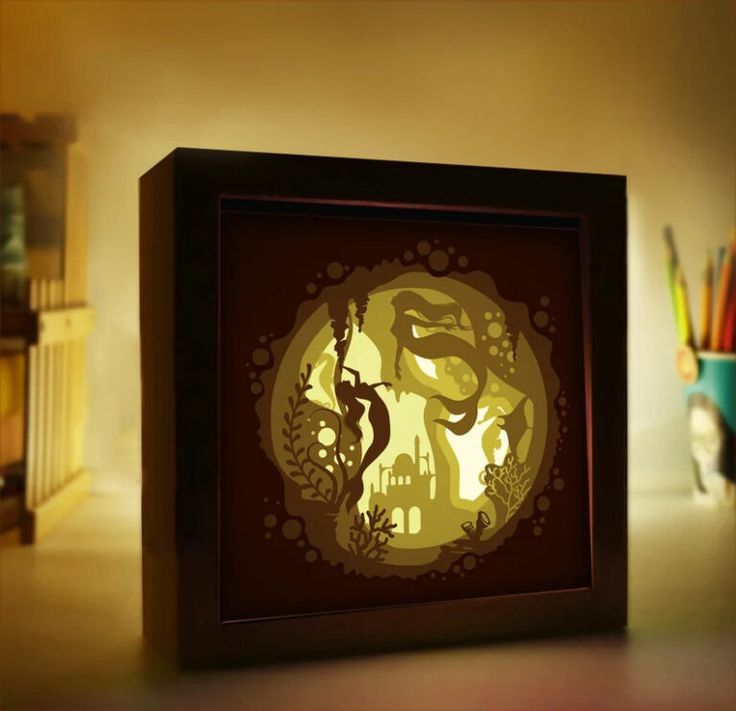

Mermaid Lightbox Template2: Turn a Few Cuts Into a Glowing Undersea Keepsake
Make It in 3 Easy Steps
- Download your files Grab your PNG and JPG files and save them somewhere easy to find. Open them in Cricut Design Space, Photoshop, or Canva to start planning your layers.
- Prepare your design Bring the template into your software and scale it to the size you want for your lightbox. Take a moment to check each layer so everything lines up beautifully.
- Make your lightbox Cut, assemble, and add a soft light behind your layers. Then step back and watch your mermaid scene glow to life.
See also: our More collection
Finished Projects to Try
- A glowing nursery nightlight that feels calm and magical
- A handmade birthday gift for a mermaid-loving friend
- A cozy shelf accent that adds a warm underwater glow
- A keepsake for a child's room that grows with them
- A thoughtful just-because gift that makes someone smile
Why It's So Easy
- Works with sublimation printers such as Epson and Sawgrass, plus the Cricut Mug Press, tumbler heat press, and heat press for your finished projects
- Designed for 3D paper cut light boxes and layered paper scenes
- Easy to mix and match with your own papers, colors, and backing choices
- Beginner-friendly files that open in Cricut Design Space, Photoshop, and Canva
What's Included
You receive two high-resolution files: a PNG with a transparent background and a JPG with a solid background, both at 300 DPI.
- 2 files, delivered in one ZIP folder
- Formats: PNG, JPG
Specifications
| Resolution | 300 DPI |
|---|---|
| Background | PNG: transparent; JPG: solid background |
You'll also love Horse 3D Paper Cut Light Box Template
How to Download & Unzip Your Files
- Download the ZIP file from your order page or My Account › Downloads. A computer makes the next steps easiest.
- Unzip it. Windows: right-click the file › Extract All. Mac: double-click the file. iPhone/iPad: open it in the Files app and tap it. Android: open it with Files by Google › Extract.
- Upload the file you need into your design software, then size it for your project and start creating!
License
| You're welcome to | Please don't |
|---|---|
| Use the design for your personal projects and gifts | Resell, share or give away the digital files |
| Sell finished handmade items (shirts, tumblers, signs…) in your small business | Upload the files to print-on-demand or file-sharing marketplaces |
| Resize and recolor the design to fit your project | Claim the design as your own artwork |
Questions about a bigger project? Email us at [email protected] and we'll gladly help.
Instant Digital Download
Instant digital download. Your files are ready the moment your payment is complete. You'll find them on the thank-you page, in your confirmation email and anytime in My Account › Downloads. This is a digital product, so nothing will be shipped. Colors may look slightly different from screen to screen and printer to printer.
Before You Start
You get a PNG with a transparent background and a JPG with a solid background, both at 300 DPI.
Yes, you can scale the files in your software to fit the size of your lightbox. The 300 DPI resolution helps keep your details crisp.
The template works in Cricut Design Space, Photoshop, and Canva, so you can use the program you already know.
Absolutely. A finished mermaid lightbox makes a heartfelt keepsake for birthdays, nursery decor, or a just-because surprise.
View more: Dragon 3D Paper Cut Light Box Template
Need a hand?
We're here to help! Email us at [email protected] and we'll get back to you within 24 hours.
Email our teamShow Us What You Made
We would love to see how your mermaid lightbox turns out! Leave a review and share a little of your handmade joy with the next crafter.

Reviews
There are no reviews yet.