
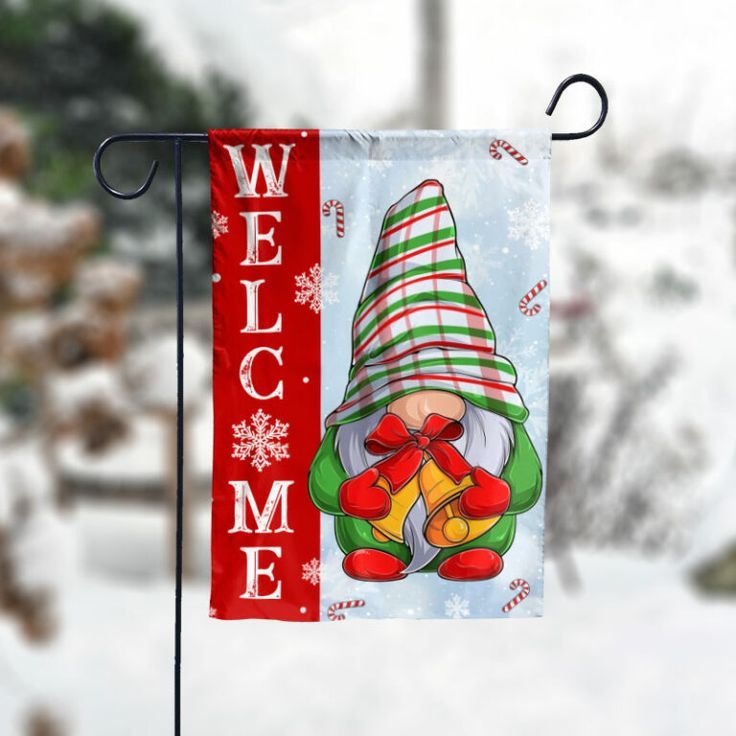
Christmas Gnome Welcome Garden Flag: A Merry Hello for Your Yard
From Download to Done
- Download Download the design file to your computer and save it where you keep your craft projects.
- Prepare Open the file in Cricut Design Space, Photoshop, or Canva to resize or personalize it for your garden flag.
- Make Print your design with a sublimation printer and press it onto your flag blank using a heat press, then display it with pride.
You'll also love Halloween Craft Ideas 2026: Decor
What You Can Make
- A cheerful Christmas garden flag that welcomes guests to your home
- A handmade gift for a neighbor or friend who loves holiday decor
- Matching tumblers or mugs that spread gnome cheer at holiday gatherings
- Personalized ornaments that become keepsakes for years to come
- Festive t-shirts for family photos or Christmas morning
Why It's So Easy
- Works with sublimation printers such as Epson and Sawgrass, plus a heat press for flags and shirts, a tumbler heat press for tumblers, and a Cricut Mug Press for mugs
- Designed for Christmas projects like garden flags, tumblers, shirts, and ornaments
- Mix and match with your favorite holiday designs to create a coordinated look
- Beginner-friendly and easy to use in Cricut Design Space, Photoshop, or Canva
Specifications
| Design size | 12 x 18 in |
|---|
View more: our Flag collection
How to Download & Unzip Your Files
- Download the ZIP file from your order page or My Account › Downloads. A computer makes the next steps easiest.
- Unzip it. Windows: right-click the file › Extract All. Mac: double-click the file. iPhone/iPad: open it in the Files app and tap it. Android: open it with Files by Google › Extract.
- Upload the file you need into your design software, then size it for your project and start creating!
License
| You're welcome to | Please don't |
|---|---|
| Use the design for your personal projects and gifts | Resell, share or give away the digital files |
| Sell finished handmade items (shirts, tumblers, signs…) in your small business | Upload the files to print-on-demand or file-sharing marketplaces |
| Resize and recolor the design to fit your project | Claim the design as your own artwork |
Questions about a bigger project? Email us at [email protected] and we'll gladly help.
Instant Digital Download
Instant digital download. Your files are ready the moment your payment is complete. You'll find them on the thank-you page, in your confirmation email and anytime in My Account › Downloads. This is a digital product, so nothing will be shipped. Colors may look slightly different from screen to screen and printer to printer.
Frequently Asked Questions
You can open the design in Cricut Design Space, Photoshop, or Canva. These programs let you resize and prepare the design for your project.
You will need a sublimation printer, such as an Epson or Sawgrass model. These printers use special sublimation ink to transfer the design onto your project.
Yes, you can resize the design in your software to fit various projects like garden flags, tumblers, or ornaments. Just keep in mind that the original dimensions are 12 x 18 inches.
This design is perfect for Christmas garden flags, but you can also use it on skinny tumblers, mugs, polyester t-shirts, and ornaments. Let your holiday creativity shine!
Absolutely! The design is easy to use, and with basic knowledge of your software and equipment, you can create beautiful projects even if you are new to sublimation.
Looking for more ideas? Explore Christmas Wreath Welcome Garden Flag
Need a hand?
We're here to help! Email us at [email protected] and we'll get back to you within 24 hours.
Email our teamThank You for Creating With Us
We would love to hear how your Christmas gnome garden flag turned out—please leave a review and share your festive moment with us. Thank you for choosing our design for your holiday projects!


Reviews
There are no reviews yet.